
Download Bank File Button - Sage X3 Customisation
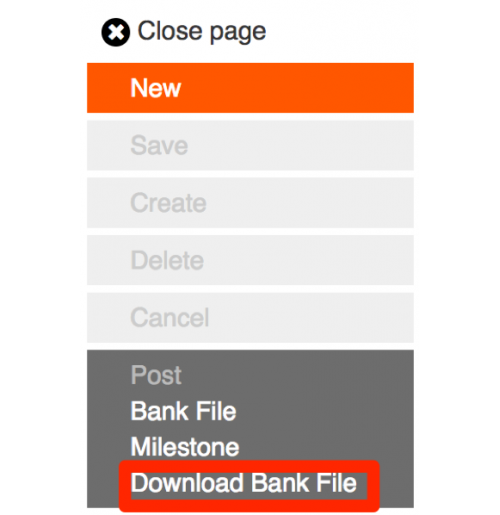
If you're using Sage X3 PU9 to generate bank files, you've probably run into this little issue. When generating bank files, you can only save them to a Sage volume, which may not be the easiest place to access.
With this customization, you can now download all bank files to your local machine. Just continue your normal process and when you have created your remittance you simply:
- Post the remittance
- Generate the bank file as usual
- And click the Download Bank File button
It's super easy. So download the customization today and see how easy it is.
| Supported Systems | |
| ERP Software | Sage X3 |
Warning: A non-numeric value encountered in /var/www/store/public_html/appfinder/catalog/view/theme/megashop/template/product/product_related.tpl on line 8


Related Products
$200.00
$40.00
$80.00
$80.00
Price
- $30.00
- Developed by a Prospr Certified Consultant
- 3 Months Free Support
- Documentation Included
Reviews: 0
Sold: 1
Views: 6746
ERP Systems
Sage X3
Compatibility
PU9
Date Added
10/08/2017
Last Updated
02/11/2017